Container manager · Personal project
fcontainers
Containerization system for creating and managing lightweight containers on Linux, using only system libraries.
About the project
Everyone knows container management tools like Docker or Podman. These tools handle the creation and management of lightweight containers to run applications in isolation. However, many people use these tools without really understanding how they work or, indeed, what a container actually is. How are these tools able to create fully isolated, lightweight environments that share the same kernel as the host?
My goal with this project has been precisely to understand how containerization and virtual networking work. fcontainers is a personal, educational project that has allowed me to understand the factors involved in containerization. For obvious reasons, this project is not intended to replace fully developed tools like the ones mentioned above. However, fcontainers stands out for having been built completely from scratch and for being able to run containers in the foreground and background and connect them to each other.
The project is divided into different parts, taking Docker as inspiration, which work together:
- Runtime: this program is responsible for running the containers and, if running in the background, creating the intermediary process (fcontainers-shim).
- Daemon: the fcontainers daemon is in charge of managing all the containers. This process uses the runtime to create containers, keeps track of which containers are running, manages access to background containers, and handles their removal when requested.
- CLI: as its name indicates, this program is a CLI that allows the user to interact with the daemon in order to manage containers conveniently.
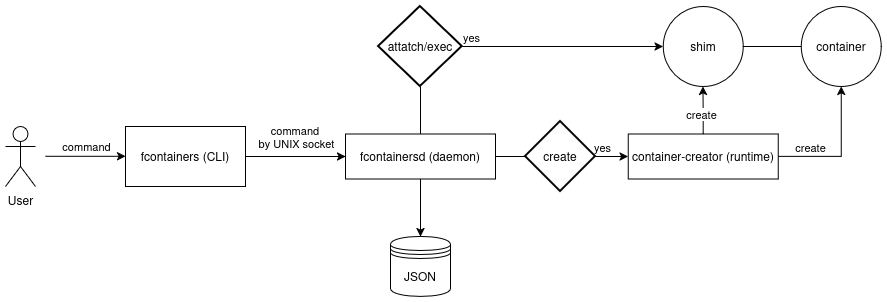
fcontainers flow diagram
Runtime
The runtime is a program written in C++ whose goal is to create the container. The first thing worth noting is the choice of programming language. Although the whole project could have been done in Go, I chose C++ for the runtime for one main reason: to keep the creation of the container as close to the OS as possible. For practicality, I did not resort to syscalls directly, but I found it interesting and much more educational to experiment with the C standard library wrappers.
A very important aspect that the runtime handles is connectivity. This program also takes care of creating a virtual switch so that containers can communicate both with each other and with the outside world. This was done using the libnl library, which allows NETLINK messages to be encapsulated in a convenient and simple way. Thanks to it, interfaces are created that connect the host and the container.
A complex part of the project was designing the background execution system. A mechanism is needed to be able to create processes within this new container. This translates into being able to create processes in the same set of pid, mount, net, user, cgroups, and ipc namespaces as the process acting as init inside the container. For this task, and taking Docker as a reference, the concept of the fcontainers-shim was introduced.
The fcontainer-shim is a process that acts as an intermediary between the world of the container and the world of the host. It listens on a socket waiting for attach or exec commands to run inside the container and redirect its input/output. Although this process could have been integrated as part of the container's init, I decided to create it as a separate process alongside init in order to keep the concepts separate.
A simple runtime that, thanks to minimal dependencies, manages to produce fully isolated and functional containers.
Daemon-CLI
Both the daemon and the CLI are two tools that work in tandem to allow the end user to perform actions on containers transparently with respect to the architecture. Both programs were developed within the same Go project for several reasons.
- Goroutines: Go is a programming language that allows thousands of tasks to run simultaneously with little complexity thanks to goroutines. It also has the standard net library, which greatly simplifies the management of sockets and connections. For this reason, it was decided to implement the daemon in Go.
- Cobra: the Cobra library makes it incredibly easy to configure the commands that can or cannot be run in a Go program. This way, a CLI can be built in Go with just a few lines of code.
- Shared protocol: as mentioned above, both the daemon and the CLI were developed in Go, but the decision to keep them within the same project stems from the dependency between them. The CLI must be able to communicate effectively with the daemon, so both must share a common protocol. Thanks to Go's types, two programs within the same Go project can handle the encoding and decoding of a shared protocol without extra processes.
As for how it works, the daemon is responsible for running the runtime to create the containers and stores all the relevant information about them in a JSON file. For example, it stores a container ID, its name, its PID, its state, and also the connection socket to the associated shim. This way, a correspondence is maintained between a container and the communication channel with its associated shim, which handles all of its requests.
Finally, I want to mention how the daemon and the CLI handle the connection to the container. This requires prior communication from fcontainersd to the fcontainers-shim, through the socket, to indicate the type of connection (attach or exec) the client wants. Afterward, the CLI is sent the socket on which the shim will be handling the requested operation.
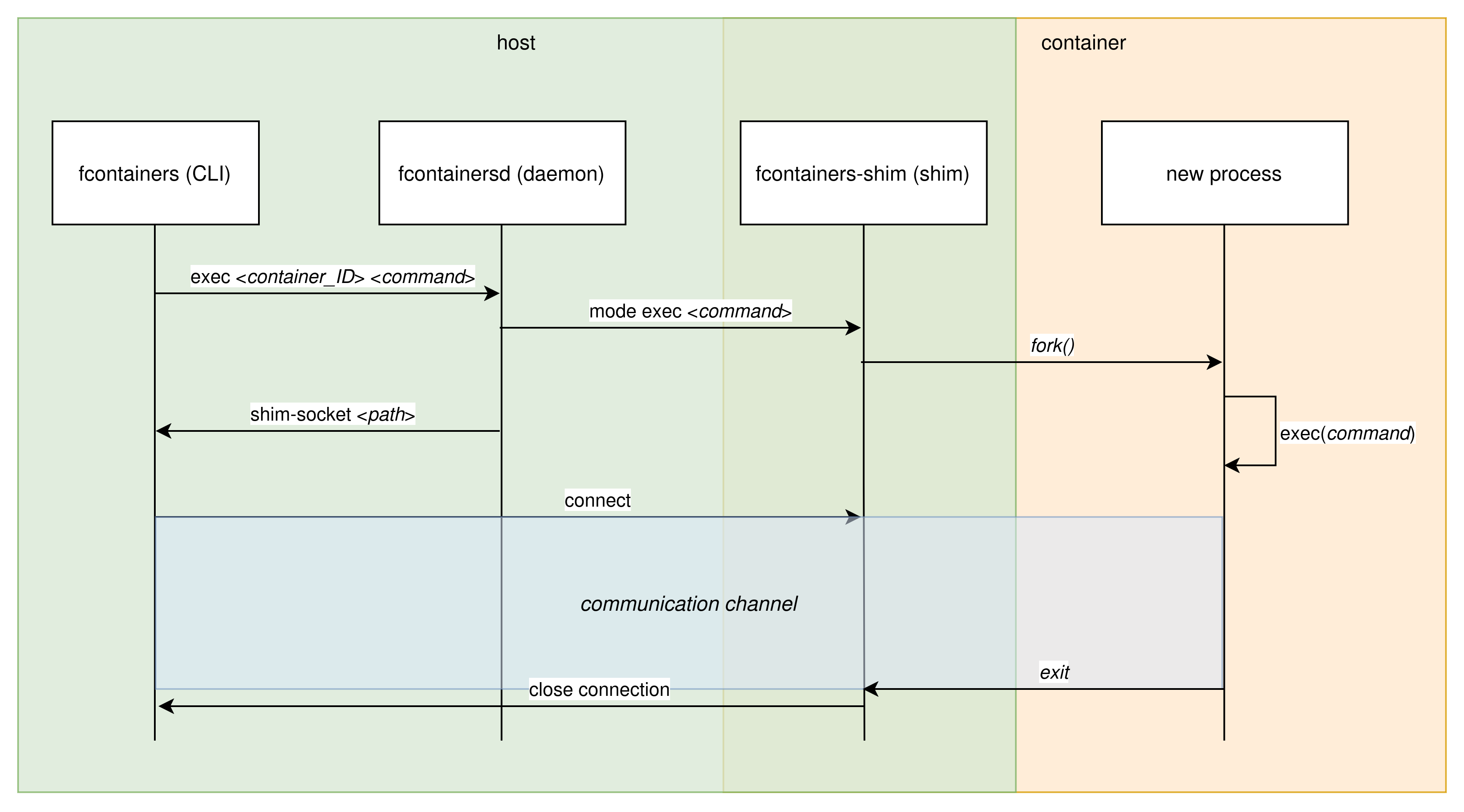
Exec command flow diagram